FOR INFORMATION ONLY
How to add mobile card page to homescreen on iPhone:
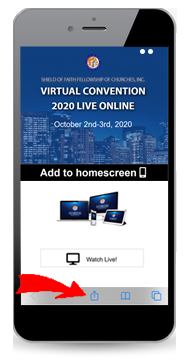
If you are on a mobile card page tap the share icon at the bottom (See red arrow below). Then tap 'Add' to Home Screen from the menu.
How to add mobile card page to homescreen on iPhone:
If you are on a mobile card page tap the share icon at the bottom (See red arrow below). Then tap 'Add' to Home Screen from the menu.
How to add mobile card page to homescreen on Android?
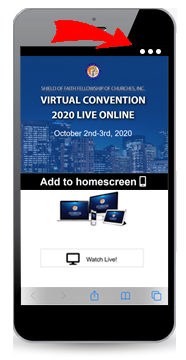
If you are on a mobile card page tap the menu icon (3 dots in upper right-hand corner) and tap 'Add' to homescreen.
The shortcut name and icon will be automatically added to your home screen.
Scan the QR code using the camera located on your touch device

Would your like our creative team to develop your mobile experience? CLICK HERE